Home
Readers' Portfolios
Submit Your Portfolio
Graphic Design Blog
Design Book Store
About This Website
Graphic Design Jobs
Write a Good Resume
Job Interview Tips
Learn About The Job
Finding Inspiration
Software to Learn
Student CS5 Discount
Common Paper Sizes
Color Mode Basics
Color Management
Press-Ready Images
Clipping Path Cutouts
Cutouts That Blend
Four Hair Cut Outs
Cutout Hair Tut #01
Cutout Hair Tut #02
Cutout Hair Tut #03
Cutout Hair Tut #04
Process/Spot Printing
Image File Formats
Bitmap Tutorial
Gimp v Photoshop
Convert Text to Paths
Create Vector Logo
Pre-Press Checklist
Overprinting Issues
Create InDesign Files
qxd indd Text Extract
Convert QXD to INDD
QXD to INDD Example
Q2ID In Action
ID2Q In Action
Convert PUB to INDD
Convert .PUB to .PDF
Quark Style Sheets
InDesign Style Sheets
5th Black Spot Color
Edit PDF Files Part 1
Edit PDF Files Part 2
Typing Accent Marks
Proofreading Marks
Proofreading Basics
Video Tutorials
Bling Layer Effects
Glassy Layer Styles
Photoshop Glass Tips
Royalty Free Images
Illustrator Tutorials
AI Illustration Tips
Illustrator Gradients
Gradient Mesh Tool
Illustrator Live Trace
InDesign Tutorials
INDD Transparency
Multiple Page Spread
Drop Shadow Issue
Reshaping an Advert
Font Recognition
Using Dreamweaver

[?] Subscribe To This Site

XML RSS
Add to Google
Add to My Yahoo!
Add to My MSN
Subscribe with Bloglines


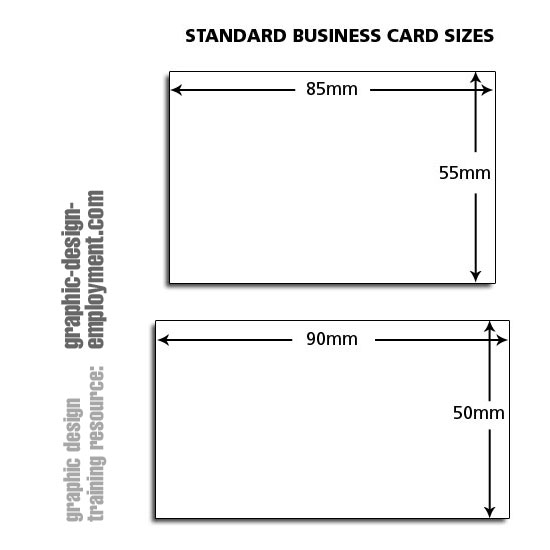
Business Card Standard Sizes

Business card standard sizes are 85mm x 55mm and 90mm x 50mm.

Business card size uses

There are 1001 uses for this format. Business cards tend to use the 85mm x 55mm size.
Compliment Slip Paper Size

Adobe Creative Suite 4 Master Collection - FullAdobe InDesign CS4 - FullAdobe Photoshop CS4 - FullAdobe Illustrator CS4 - FullAdobe Acrobat 9 Pro - Full


Business card templates - InDesign download (version CS) and Quark download (version 5)

When setting up Quark or InDesign documents, just as important as the document size is the need for correctly positioned margins, gutters and bleed (if required). Below are some typical documents set up in InDesign and Quark which might speed up your production process.

Each document has been set up with guides in place as well as 5mm bleed throughout. InDesign is great at adding bleed marks and guides, but Quark is not so great - so we've done it for you. All files are compressed with a .zip suffix.

Resources & More Information


Did you find this website useful? Did you find what you were looking for?
Please let us know and help us to improve our site.

Without your valuable feedback it's difficult to write new articles for Graphic Design Employment.com that are of use. Please click here and let us know what you thought of our site - and if you didn't find what you were looking for, please tell us so we can try to fill the gaps. Thanks for visiting, and we hope to hear from you.

Search Graphic-Design-Employment.com